A remote pumping station loses contact with the control room at two in the morning. Nothing is wrong at the station. The mobile operator's nearest cell site has lost power, and the router is sitting there with a perfectly good modem and no network to talk to. By the time someone drives out, the operator has restored service, and there is nothing to fix.
Situations like this are the reason dual SIM industrial routers exist. A second SIM, ideally on a different operator, gives the router another way out when the first network fails. It is one of the simplest and most cost-effective ways to improve availability at unattended sites. It is also widely misunderstood. A dual SIM router that is set up carelessly can switch at the wrong time, fail to switch at all, or break the VPN and SCADA connections it was supposed to protect.
This guide explains how dual SIM failover works in industrial routers, what it can and cannot protect against, and how to configure and test it before the router goes into the field.
How a Dual SIM Industrial Router Works
Two SIMs, and how many radios?
Dual SIM designs fall into two broad groups. In the more common one, a single cellular module serves two SIM slots, and only one SIM is active at a time. When the router decides to switch, it detaches from the first network, activates the second SIM, and registers with the second network. In the other group, the router has two cellular modules, so both links can be up at once and traffic can move between them without a new registration.
Both approaches are used in industrial products. The difference affects how long a switchover takes and whether traffic can be shared across links. When evaluating any dual SIM industrial router, ask the supplier which architecture each model uses and what switchover time has been measured in practice.
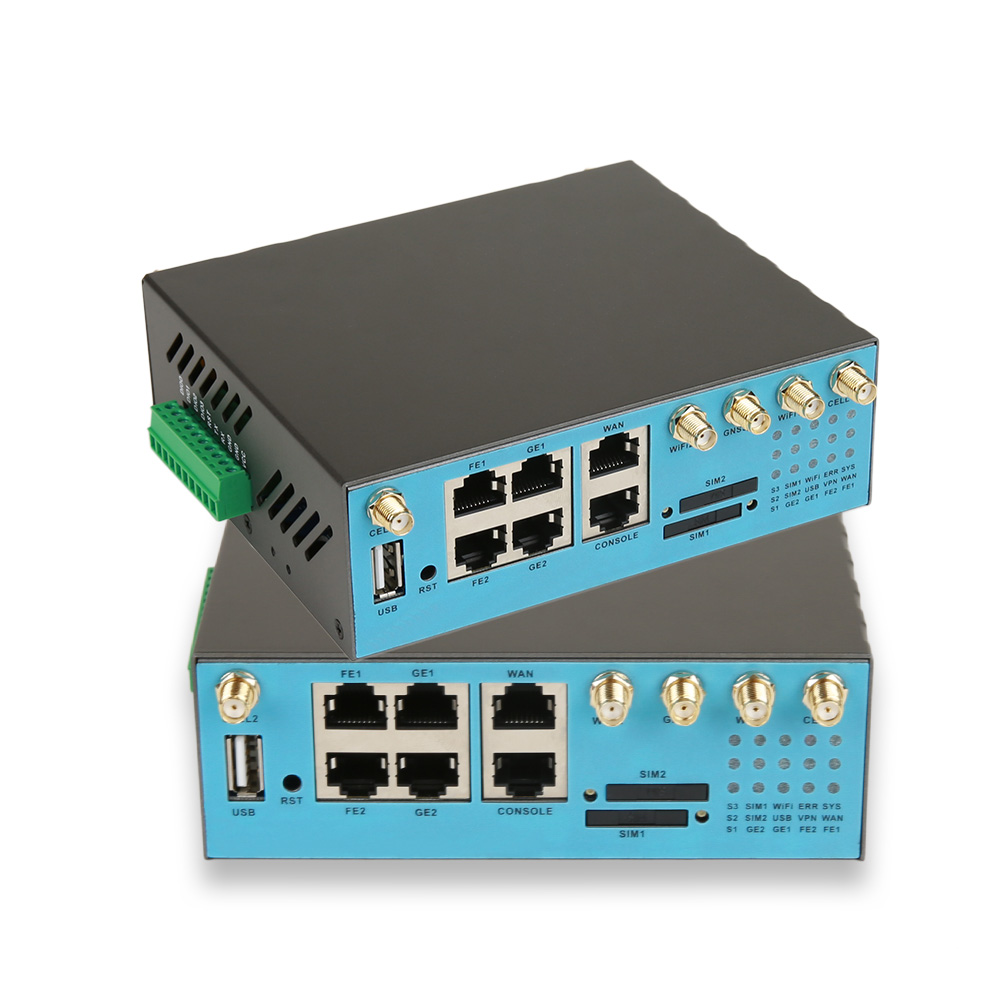
The E-Lins H900f Gigabit 5G Industrial Router supports dual SIM hot backup with automatic failover switching within seconds, designed to keep critical operations running when the primary network becomes unavailable.
What triggers the switch
The obvious trigger is losing the network entirely. That case is easy. The harder and more common case is a link that appears connected but does not carry traffic. The modem is registered, the data session is up, the signal bars look fine, and yet packets are not getting through because of congestion, a problem in the operator's core, or a routing fault upstream.
For that reason, failover should not rely on signal strength or registration status alone. A good configuration checks the data path itself, typically by sending periodic probes to one or more reliable hosts, such as the VPN head-end and a second independent address. If several consecutive probes fail, the router switches. Using more than one probe target avoids switching just because a single server is down.
Failback deserves as much attention as failover
Once the router is on the backup SIM, when should it return? If it switches back as soon as the primary network reappears, an unstable cell can cause the router to bounce between SIMs every few minutes, and each switch interrupts traffic. Most deployments set a minimum time on the backup link, then test the primary before moving back. Data plan costs also matter. If the backup SIM is on a smaller or more expensive plan, the router should not stay on it longer than necessary.
Choosing the Two SIM Cards
Use different operators. Two SIMs from the same operator share the same towers and core network. They protect against a faulty SIM, but not against the outages that cause most problems. Different operators give genuinely independent paths wherever both have coverage.
Check coverage at the installation point. Coverage maps are estimates. Signal inside a metal cabinet at ground level can be very different from the map. Measure both networks on site before deciding which SIM is primary.
Plan addressing and VPNs for both links. When the router changes SIM, its public IP address changes too. Any system that connects to the site by public IP will lose it. The more reliable pattern is to have the router build a VPN to the head-end over whichever link is active, so the control centre always reaches the site at the same private address. E-Lins routers support WireGuard, IPsec and OpenVPN. WireGuard in particular re-establishes tunnels quickly after an address change. If both SIMs use private APNs, confirm that both are routed to the same head-end.
What Dual SIM Cannot Fix?
It is worth being clear about the limits. A second SIM does not protect against:
Local power loss. If the router has no power, neither SIM helps. Consider UPS or battery backup for critical sites.
Antenna or cable damage. In single-module designs, both SIMs normally share the same antenna system.
Wide-area events. A storm that takes down power across a region may affect every operator's cell sites at once.
Router failure. Hardware watchdog timers and link self-healing mechanisms help the device recover from software faults, but a failed unit still needs replacing.
For sites where cellular redundancy is not enough, mixing link types is more effective. The E-Lins H900 Gigabit Industrial 4G Router supports triple-link backup across cellular, wired and Wi-Fi connections, so a site with a fixed line can use cellular as its backup path, or the other way round.
Configuration Checklist for Unattended Sites
Define the primary SIM based on on-site measurements, not on which contract was signed first.
Set data-path probes to at least two independent targets, with a sensible interval and a failure count that avoids switching on a single lost packet.
Set a minimum backup period and a primary-link test before failback.
Make the VPN independent of the active SIM, so central systems use a fixed private address.
Adjust SCADA timeouts so the master tolerates a short switchover without raising a communications alarm for every event.
Report every switch to the network management system. E-Lins supports SNMP, SSH, TR-069, and NMS cloud platforms, so failover events can be logged and reviewed centrally. A site that changes SIM several times a day is telling you something about its primary network.
Test Before You Deploy
Failover should be tested on the bench and again on site. Remove the primary SIM while traffic is running. Block the probe targets to simulate a link that is up but not working. Measure how long the switchover takes, and check that the VPN re-establishes and the central application reconnects without manual action. Then restore the primary and confirm that failback happens when it should.
This is also where supplier support makes a difference. E-Lins provides 7x24 remote technical support, including packet capture analysis and remote debugging, with an average response time of 10 minutes during business hours. A failover issue that only appears in the field is much easier to resolve when someone can look at the actual traffic.
Dual SIM in Practice
The value of well-designed redundancy shows up in operating results. A smart transportation provider in Sweden, Norway and Denmark using E-Lins equipment for in-vehicle networking and electronic stop displays reduced its network interruption rate to 0.3% in winters as cold as -32°C, with 90% of faults handled remotely. A leading Indian telecom operator using E-Lins equipment for remote base station monitoring achieved a 99.4% equipment online rate across 100,000 units, despite unstable power and temperatures reaching 48°C.
About E-Lins Technology
Shenzhen E-Lins Technology Co., Ltd. develops and manufactures industrial M2M and IoT wireless communication equipment for unattended and distributed environments, with industrial roots going back to 1999. Its routers use industrial-grade components rated from -35°C to +75°C, with 15KV ESD protection, and run firmware developed entirely in-house. The company supplies customers in more than 150 countries and regions and provides lifetime free firmware upgrades.
A dual SIM industrial router is not a guarantee of uptime. It is a tool, and it works best when the SIMs, probes, VPN design, and failback rules are planned together. Done properly, it turns many of those two-in-the-morning outages into a log entry that nobody has to drive out for.
https://e-lins.com/
Shenzhen E-Lins Technology Co., Ltd.